


BBMT / Produits / IFC ToOls
TrussIFC
TrussIFC prepares structural truss IFC models for Autodesk Construction Cloud and preserves element GUIDs between model revisions.

# TrussIFC
**Prepare structural truss IFC models for Autodesk Construction Cloud and preserve element identities between model revisions.**
TrussIFC is a Windows desktop application developed by BBMT for processing structural truss IFC models before coordination and clash detection in Autodesk Construction Cloud.
The application provides one simple drag-and-drop workspace and automatically selects the correct workflow depending on whether you provide one IFC file or two.
## Prepare IFC models for ACC
Drop a single Simpson truss IFC model into TrussIFC to create an ACC-ready version.
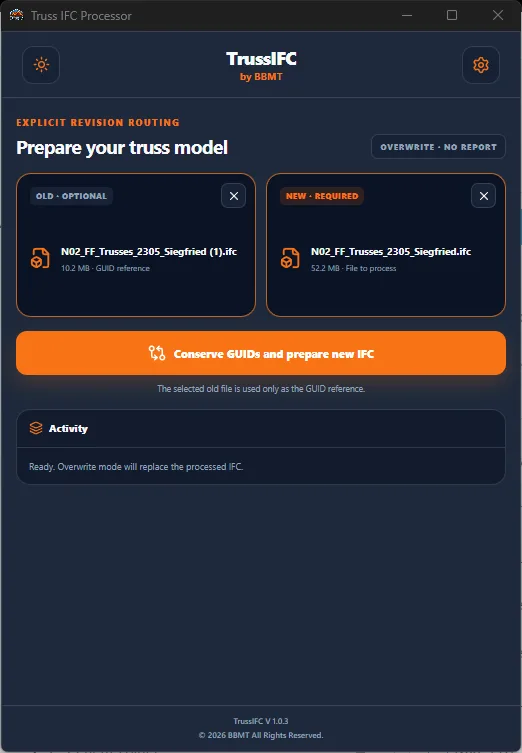
TrussIFC restructures the model so that individual truss members can be recognized and used during clash detection while retaining the original truss assembly organization.
The application:
* Keeps truss assemblies as IfcElementAssembly.
* Makes individual physical truss components available for ACC clash detection.
* Converts supported truss members and plates into ACC-compatible IFC elements.
* Updates spatial containment relationships.
* Removes unnecessary slab elements and related references.
* Applies IFC4 and CADwork-style metadata.
* Improves body representations for ACC compatibility.
* Converts encoded dimensions into readable feet-and-inch fractions.
* Organizes custom truss properties under a clear TrussIFC category.
* Flattens nested reaction information into directly accessible properties.
## Preserve GUIDs between revisions
Drop an old IFC model and a new revision together to preserve element GUIDs before preparing the revised model for ACC.
TrussIFC automatically identifies the old and new models using their Windows modification dates. It then compares truss assemblies, members, plates, parent relationships, hierarchy positions and repeated element occurrences.
When a reliable match is found, the GUID from the old model is assigned to the corresponding element in the new revision.
This helps Autodesk Construction Cloud recognize revised elements as existing model objects instead of treating the entire revision as newly created content.
Unmatched new elements keep their original GUIDs, removed elements are reported, and duplicate final GUID assignments are prevented.
## Complete GUID reports
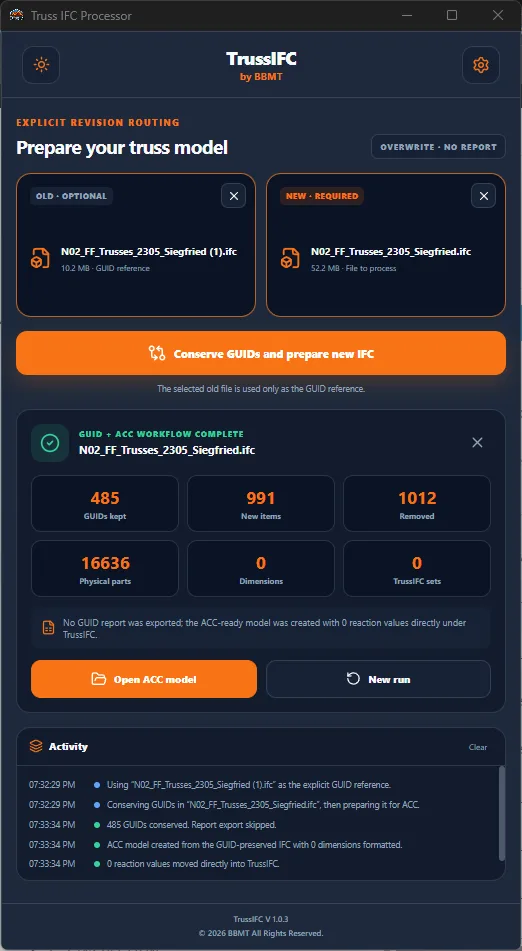
Two-file processing generates detailed CSV and Excel reports containing:
* Conserved GUIDs.
* New unmatched elements.
* Elements removed from the new revision.
* IFC entity types.
* Old and new STEP IDs.
* Element names.
* Parent truss assemblies.
* Hierarchy matching keys.
* Old, original and final GUID values.
* Actions performed.
* Processing notes.
The Excel report also includes a summary sheet with the main processing totals.
## Readable dimensional properties
TrussIFC converts encoded Simpson dimensional values into readable feet-and-inch fractions.
Examples:
* 14-07-15 becomes 14' 7 15/16"
* 1-07-03 becomes 1' 7 3/16"
* 04-02 becomes 0' 4 1/8"
Fractions are automatically reduced wherever possible.
## Simplified reaction properties
Reaction information that was originally stored through multiple nested IFC property levels is flattened directly into the main TrussIFC property category.
Bearing identifiers such as R1: and R2: are preserved so properties with similar names remain clearly separated.
This makes reaction values, bearing widths, connection types, center positions and related structural information easier to locate in IFC viewers and coordination platforms.
## Safe output options
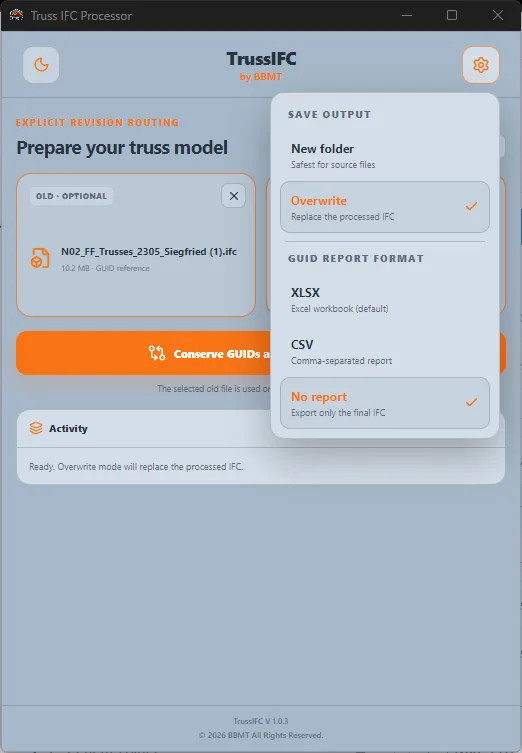
TrussIFC provides two save modes.
**New Folder**
The recommended option. Processed models and reports are saved in separate ACC and GUID Match folders beside the original files. Source IFC files remain unchanged.
**Overwrite**
The processed result replaces the selected target IFC file. This option should only be used when intentionally replacing the source model.
## Simple professional interface
TrussIFC follows the BBMT visual design system and includes:
* One unified drag-and-drop area.
* Automatic one-file and two-file workflow selection.
* Dark and light themes.
* Processing activity logs.
* Completion statistics.
* Output settings.
* Quick access to generated model and report folders.
* Clear validation and error messages.
## Typical workflow
1. Open TrussIFC.
2. Keep New Folder mode selected to protect your source files.
3. Drop one IFC file for ACC preparation.
4. Alternatively, drop the old and new IFC revisions together.
5. Review the detected workflow.
6. Allow TrussIFC to complete GUID conservation and ACC preparation.
7. Review the processing log and generated reports.
8. Upload the final ACC-ready IFC model to Autodesk Construction Cloud.
TrussIFC helps truss manufacturers, BIM coordinators, structural teams and timber construction professionals prepare more reliable IFC models, maintain element identity across revisions and improve model coordination in Autodesk Construction Cloud.