
AEC Insights
The Cloud Collaboration Stack
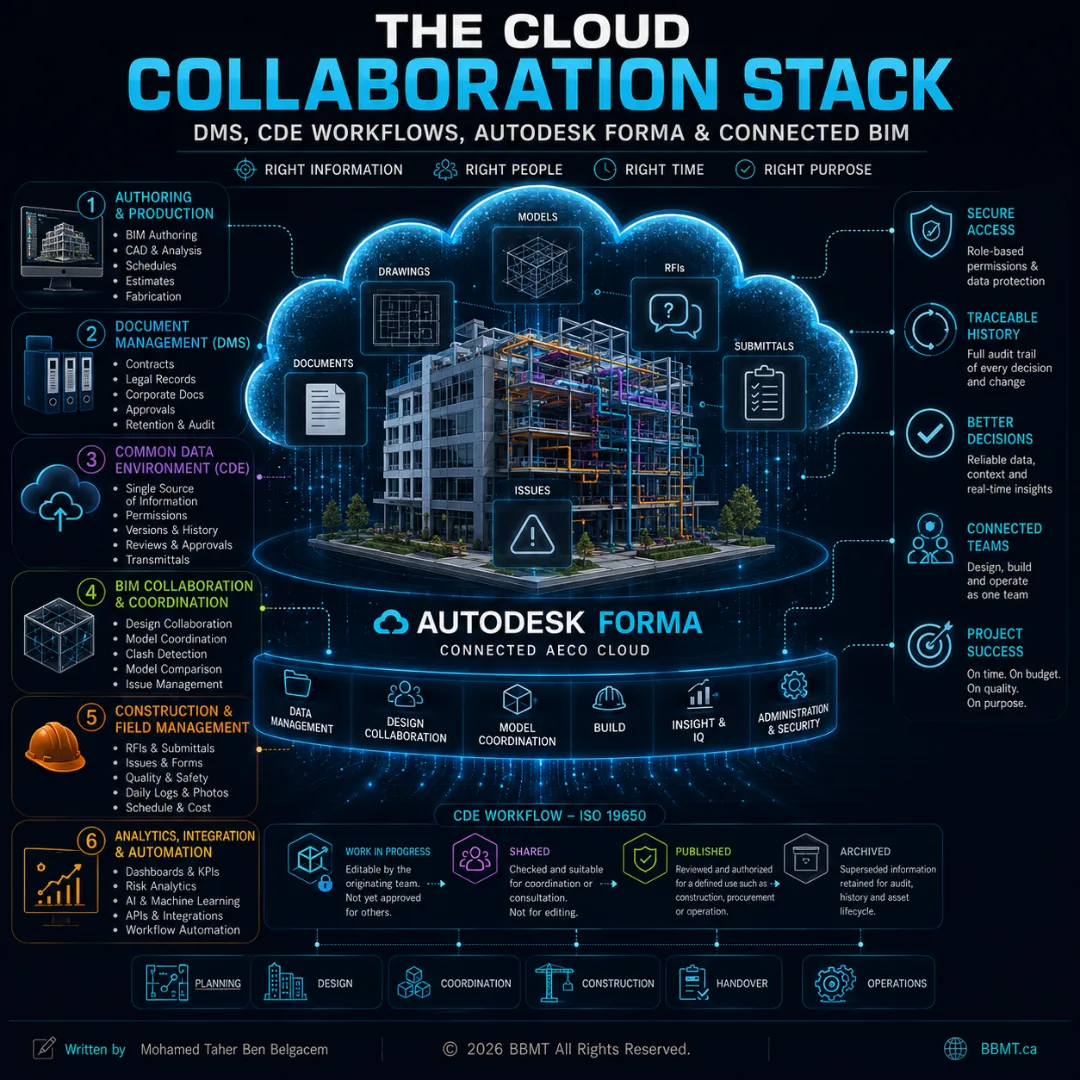
Cloud collaboration is not simply about moving project files from a local server into an online folder. This guide explains how document-management systems, Common Data Environment workflows, BIM collaboration platforms, field tools, analytics, and Autodesk Forma work together to keep project information controlled, traceable, and usable from design through construction and operations.
The Cloud Collaboration Stack
How DMS Platforms, CDE Workflows, Autodesk Forma, and Connected BIM Systems Work Together
Ask a traditional project manager where the project information is stored, and the answer may still be:
On the company server
In a shared folder
Inside an email inbox
On an employee’s computer
In a collection of disconnected cloud applications
That approach may appear manageable when a project contains only drawings, contracts, spreadsheets, and meeting minutes.
A modern BIM project is different.
Its information is continuously changing and flowing between:
Architects
Engineers
BIM and VDC coordinators
General contractors
Trade contractors
Manufacturers
Owners
Consultants
Site personnel
Asset-management teams
The project does not contain only files. It contains models, drawings, specifications, issues, approvals, RFIs, submittals, schedules, quantities, field observations, asset information, revisions, decisions, and contractual records.
This information must be:
Created
Checked
Shared
Coordinated
Reviewed
Authorized
Published
Used
Revised
Archived
ISO 19650 provides an international information-management framework covering the exchange, recording, versioning, and organization of information throughout the lifecycle of a built asset. It applies from planning and design through construction, operation, refurbishment, and end of life.
The challenge is therefore not merely:
Where should we upload the files?
The real questions are:
Which platform owns each type of information?
Who may edit it?
Who may see it?
Which version may be relied upon?
When is information ready for coordination?
When is it authorized for construction?
How are changes communicated?
How is the project history preserved?
The answers form the project’s cloud collaboration stack.
1. From File Storage to Information Flow
A shared cloud folder can solve an accessibility problem.
It does not automatically solve an information-management problem.
A project can move every document from a local server to the cloud and still suffer from:
Duplicate files
Unclear revisions
Incorrect permissions
Uncontrolled model links
Missing approval records
Multiple competing “final” versions
Outdated drawings being used on site
Coordination issues disconnected from their models
No clear distinction between draft and authorized information
Cloud collaboration becomes valuable when technology is combined with a controlled process.
The platform must help the team understand:
Who created the information
What the information is intended for
What state it is in
Which revision is current
Who reviewed or authorized it
Where it belongs
How it relates to other project information
That requires more than one type of system.
2. The Layers of a Modern Collaboration Stack
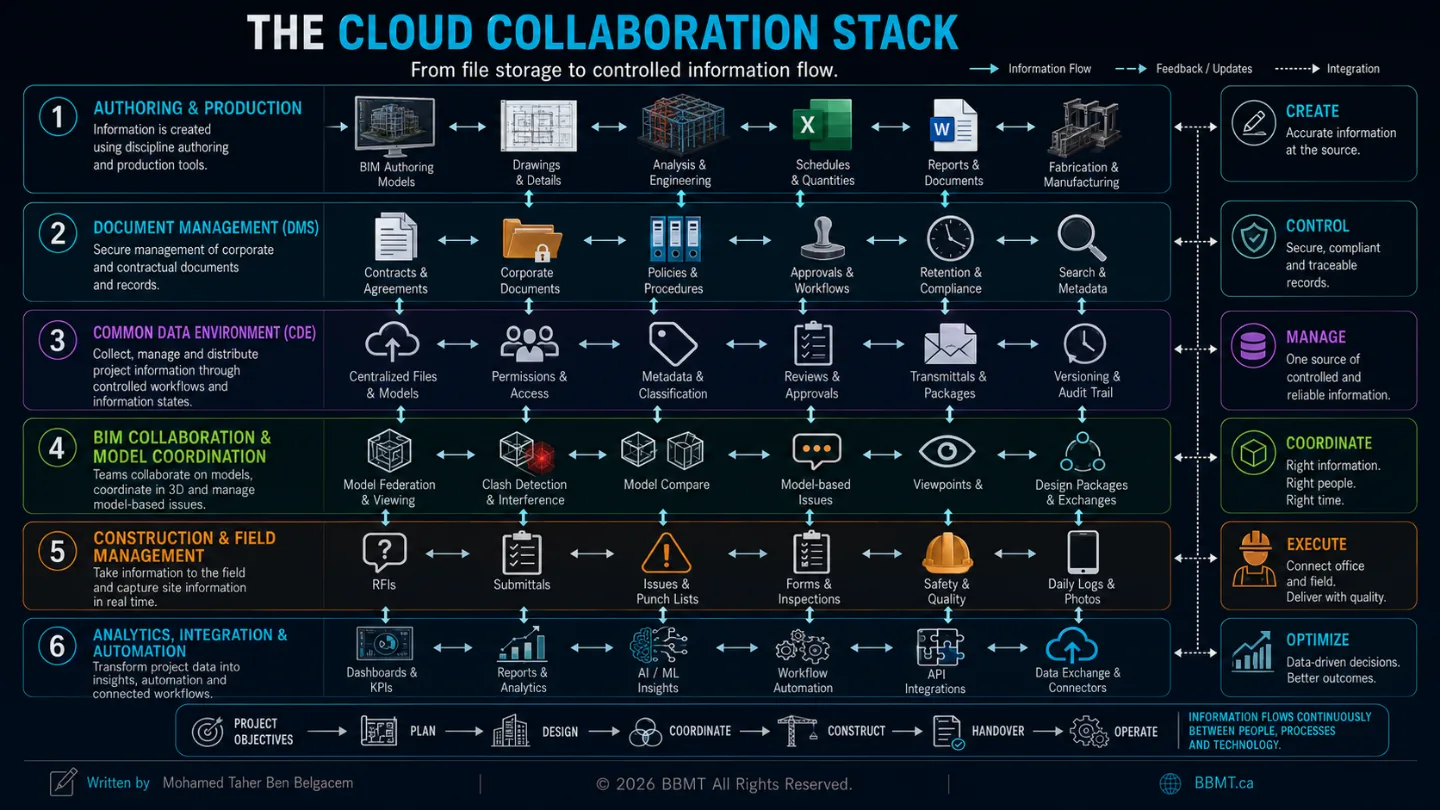
A mature project environment commonly contains several connected layers.
These layers may exist in separate products, or one platform may perform several roles.
Layer 1: Authoring and Production
This is where information is created.
Examples include:
BIM authoring applications
CAD software
Structural-analysis applications
Fabrication systems
Scheduling tools
Estimating software
Office-document applications
The information at this layer is often live, editable, and controlled by the originating team.
Layer 2: Document Management
A Document Management System, or DMS, controls documents and records.
An Electronic Document Management System, or EDMS, is the more formal version of the same term.
In French, this category is commonly called a GED, from Gestion électronique des documents. In an English article or international project, DMS or EDMS is clearer.
Typical DMS capabilities include:
File storage
Version history
Metadata
Search
Permissions
Retention policies
Approval workflows
Check-in and check-out
Audit history
Corporate and contractual records
For example, SharePoint supports document versioning, content approval, check-in and check-out, and restoration of previous versions. These capabilities make it a strong environment for controlled documents and enterprise records.
Layer 3: Common Data Environment
A Common Data Environment, or CDE, is the agreed environment and managed process through which project or asset information containers are collected, managed, reviewed, shared, authorized, and distributed.
A CDE is not defined only by having a three-dimensional viewer.
Industry guidance distinguishes between:
The CDE workflow, which defines how information is managed
The CDE solution, which provides the technology supporting that workflow
A CDE may manage:
Models
Drawings
Documents
Schedules
Databases
Reports
Specifications
Issue information
Information packages
Approval records
Layer 4: BIM Collaboration and Coordination
This layer adds model-aware capabilities such as:
Browser-based model viewing
Model federation
Element-property inspection
Model comparison
Design-package exchange
Clash detection
Coordination spaces
Model-based issues
Connections to authoring software
These features may be part of the CDE platform, or they may be provided by connected coordination tools.
Layer 5: Construction and Field Management
This layer brings controlled information to the jobsite and returns field information to the wider project environment.
It may manage:
RFIs
Submittals
Issues
Punch lists
Forms
Inspections
Safety observations
Daily logs
Meetings
Photos
Schedules
Cost information
Layer 6: Analytics, Integration, and Automation
The final layer connects and interprets project information through:
Dashboards
Risk analytics
Business-intelligence tools
APIs
Automated notifications
Cross-project reporting
Data warehouses
AI-assisted classification
Workflow automation
A complete cloud collaboration stack is therefore not one large folder.
It is a connected system that moves information between creation, coordination, authorization, construction, and long-term recordkeeping.
3. DMS vs. CDE: Different Roles, Possible Overlap
The distinction between a DMS and a CDE is often oversimplified.
A common explanation says:
A DMS stores documents, while a CDE manages BIM.
That is directionally useful, but incomplete.
A DMS may provide sophisticated permissions, metadata, approvals, records management, and auditability. A CDE may contain many conventional documents in addition to BIM models.
The more important distinction is their primary purpose.
DMS or EDMSCommon Data EnvironmentFocuses primarily on documents and recordsFocuses on controlled project and asset informationSupports versioning and retentionSupports information states and exchange processesMay serve the entire organizationOften configured around a project or assetStrong for legal, contractual, administrative, and corporate recordsStrong for multidisciplinary delivery and controlled information exchangeMay not provide advanced model coordination by defaultMay include or connect to BIM-aware workflowsOften organized around libraries, sites, departments, or recordsOrganized around responsibilities, information containers, packages, status, and intended use
Is SharePoint a CDE?
SharePoint can support parts of a CDE workflow.
It can manage:
Permissions
Versions
Metadata
Approvals
Records
Search
Controlled publication
However, its standard document-management capabilities do not provide the complete model-federation, design-collaboration, automatic clash-detection, or authoring-worksharing workflows found in specialized BIM platforms.
That does not make a BIM model stored in SharePoint a “dead file.”
It means that additional BIM services, viewers, integrations, or platforms may be needed to work with its geometry and model relationships.
A 3D Viewer Does Not Automatically Create a CDE
The reverse is also true.
A platform with an impressive model viewer is not automatically a well-managed CDE.
Without controlled:
Permissions
Revisions
Metadata
Approvals
Naming
Information states
Responsibilities
Exchange procedures
the platform may become little more than an attractive shared folder.
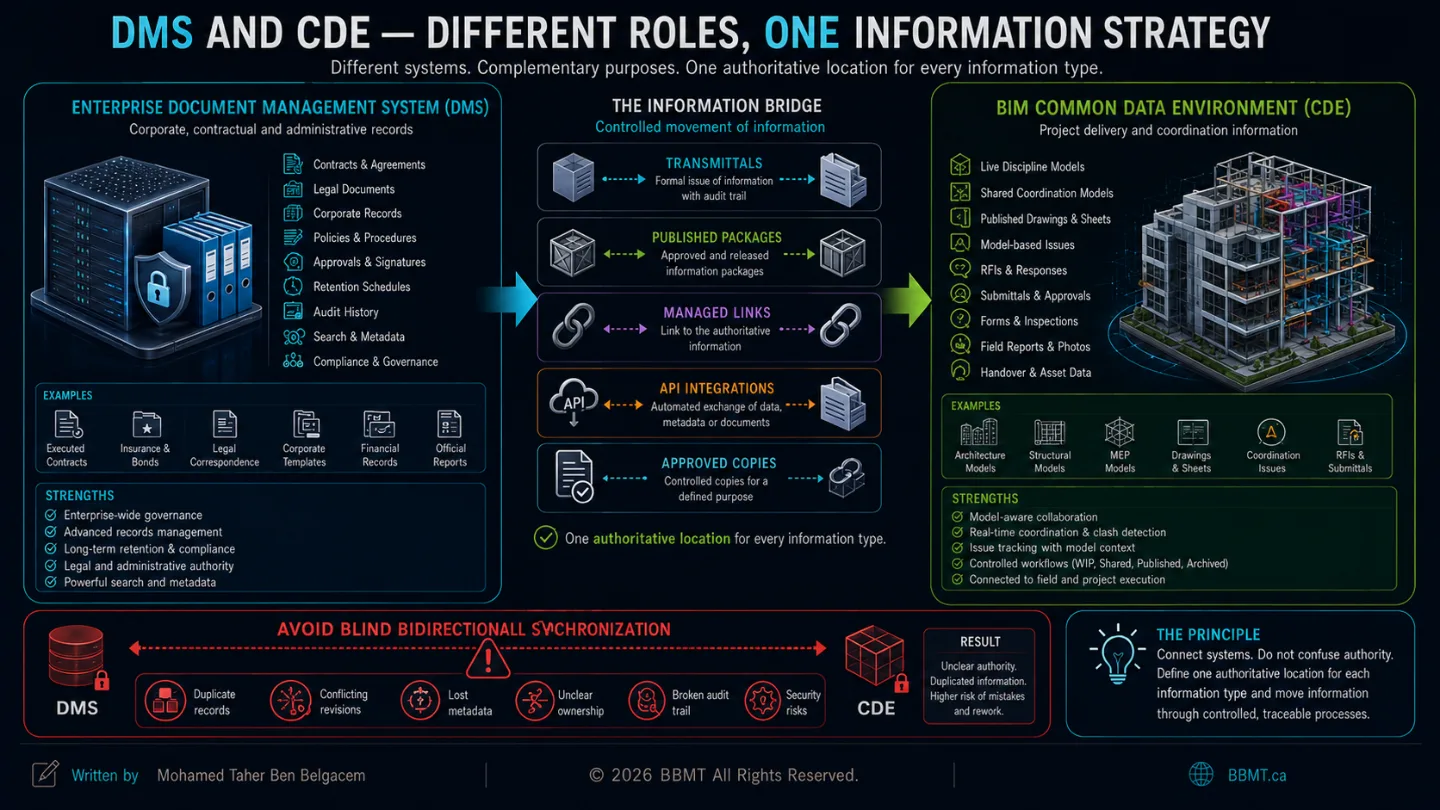
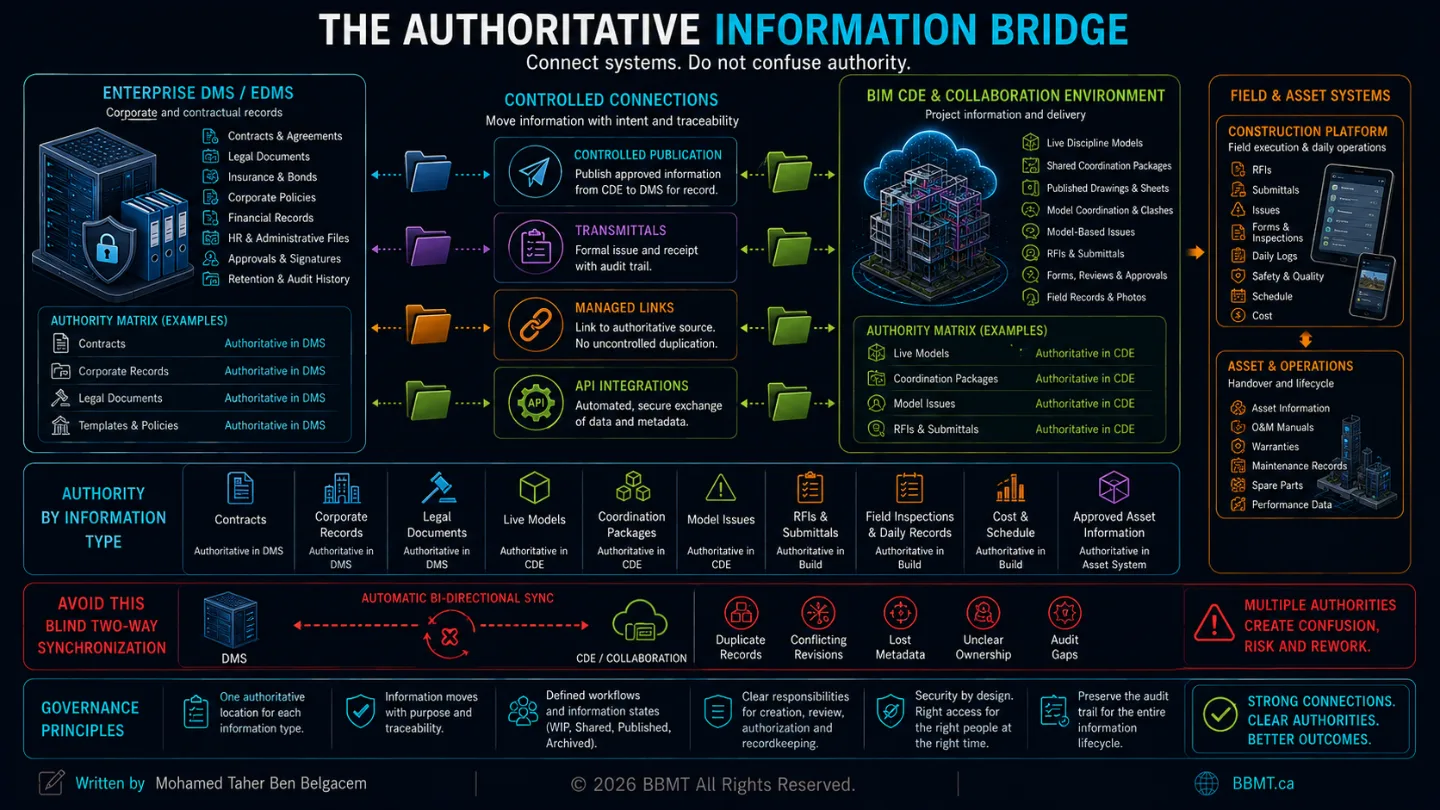
The Systems Should Not Compete
In many organizations, the DMS and BIM collaboration platform serve complementary purposes.
For example:
Enterprise DMS
Executed contracts
Insurance documents
Legal correspondence
Corporate templates
Financial records
Final administrative records
Project CDE and BIM platform
Live design models
Shared coordination models
Published drawing packages
Model-based issues
RFIs and submittals
Field information
Approved project deliverables
One platform may also perform both roles.
The important rule is:
Every information type should have one clearly defined authoritative location.
Blindly synchronizing two systems in both directions can create duplication, ownership conflicts, and uncertainty over which version is valid.
Information should move between systems through controlled methods such as:
Publication workflows
Transmittals
Approved copies
Managed links
APIs
Automated integrations
Formal archival procedures
4. The Four CDE Information States
The most important characteristic of a CDE is not the software interface.
It is the controlled movement of information between defined states.
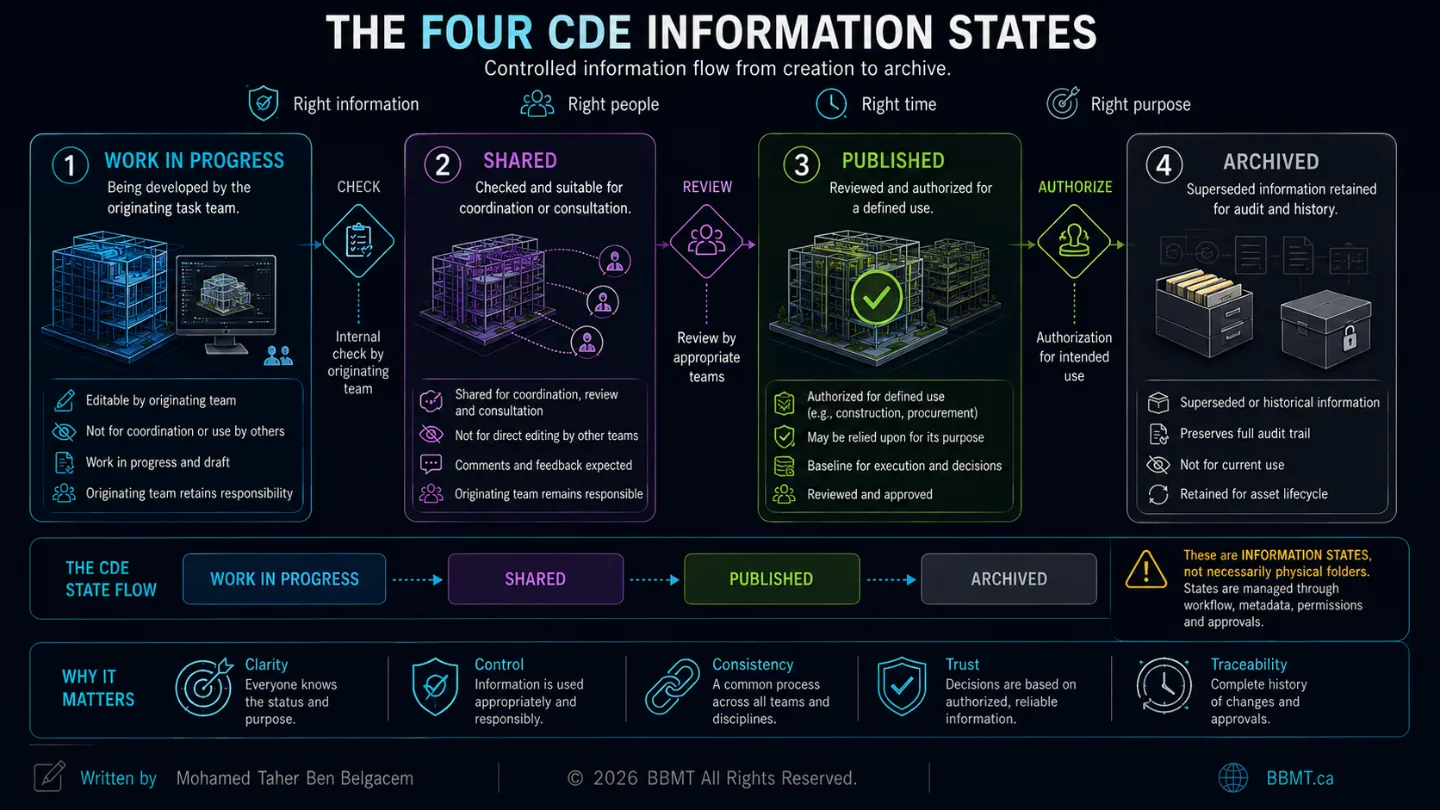
ISO 19650-based workflows commonly distinguish four principal states:
Work in Progress
Shared
Published
Archived
These are information states, not necessarily four physical folders.
A technology platform may represent them through folders, permissions, metadata, status codes, approval workflows, or a combination of mechanisms.
Work in Progress
Work in Progress, or WIP, contains information being developed by its originating task team.
Examples include:
An architectural model still being edited
A preliminary structural calculation
An unreviewed drawing
A draft specification
An incomplete fabrication model
This information is not yet approved for reliance by other task teams.
The originating organization retains responsibility for its content and should remain the only party permitted to modify it.
Shared
The Shared state contains information that has passed the originating team’s internal check and is suitable for a defined collaborative purpose.
It may be shared for:
Coordination
Consultation
Review
Comment
Interface development
Information exchange
Shared information may be visible to other teams, but those teams should not directly modify the originating team’s content. Required changes should be returned to the author or originating organization.
Shared does not necessarily mean approved for construction.
It means approved for the stated collaborative purpose.
Published
The Published state contains information that has been reviewed and authorized for a defined use.
Examples include:
Construction
Procurement
Regulatory submission
Project milestone delivery
Fabrication
Asset operation
Published information may be relied upon for its approved purpose.
If information fails the required review for completeness, coordination, or accuracy, it should be returned for correction rather than authorized.
Archived
The Archived state preserves the project’s information history.
It may contain records of:
Previously shared information
Previously published information
Superseded revisions
Approval decisions
Exchange packages
Milestone records
Archived information should remain traceable and accessible to authorized users while being protected from uncontrolled modification.
The Controlled Transition
A simplified CDE flow is:
Work in Progress
↓
Check, Review, Approve
↓
Shared
↓
Review and Authorize
↓
Published
↓
Record and Preserve
↓
Archived
This process prevents unfinished information from being mistaken for approved information.
5. Autodesk Construction Cloud Is Now Autodesk Forma
Autodesk’s cloud ecosystem has undergone an important naming change.
On March 24, 2026, Autodesk announced that Autodesk Construction Cloud, commonly called ACC, had become part of Autodesk Forma.
Autodesk now positions Forma as its connected AECO industry cloud spanning planning, design, construction, and operations. The company stated that the transition did not require customer-data migration and did not disrupt existing project data, licensing, integrations, or established workflows.
Readers may therefore encounter both the former and current names:
Previous nameCurrent nameAutodesk Construction CloudAutodesk FormaAutodesk DocsForma Data ManagementBIM Collaborate ProForma Design CollaborationAutodesk BuildForma Build
Some individual tools, such as Model Coordination, Insight, and Construction IQ, retain their functional names within the broader Forma environment.
Autodesk’s current platform offerings include:
Forma Data Management
Forma Build
Forma Design Collaboration
Model Coordination
Preconstruction
Forma AutoSpecs
Forma Site Design
The offerings share Forma Data Management as a common data environment and are connected through common administration, permissions, and project information.
6. Forma Data Management: The Information Foundation
Forma Data Management—formerly Autodesk Docs—is the foundation of Autodesk’s current cloud environment.
Calling it only a storage service would understate its role.
It provides centralized project information management across the Forma platform and includes tools for:
Files and folders
Issues
Project members
Boards
Bridge
Desktop Connector
Specifications
Reviews
Transmittals
Reports
Insight
Administration
Its documented capabilities include structured folder management, permissions, file approvals, markup tools, centralized issues, and transmittals with an audit trail.
Folder Structure
The folder structure should reflect information responsibilities and workflows rather than simply copying a company server.
A practical structure may separate:
Project administration
Design disciplines
Shared coordination
Published deliverables
Construction documents
Field records
Handover information
Archive records
The exact structure depends on:
Contractual arrangement
Team responsibilities
Information-exchange strategy
Security requirements
Project phases
Deliverable requirements
Permissions
Permissions should follow the principle of least privilege.
A user should receive only the access required to perform an assigned role.
Typical permission levels may distinguish between the ability to:
View
Download
Upload
Create
Edit
Manage
Share
Control folders
Administer the project
The objective is not to prevent collaboration.
It is to prevent unintended modification, deletion, publication, or exposure of information.
Reviews and Approvals
A formal review workflow can identify:
Who submitted the information
Who must review it
What decision was made
When it was approved or rejected
Which comments remain unresolved
Whether it may be published
The platform should support the process established by the project team. It does not decide the approval authority by itself.
Transmittals
A transmittal creates a controlled record of information issued to another party.
It should identify:
Sender
Recipient
Issue date
Purpose
Included documents or models
Revisions
Instructions
Acknowledgment or receipt
This is more reliable than emailing a folder link without recording what was formally issued.
7. Forma Design Collaboration: More Than Cloud Worksharing
Forma Design Collaboration brings several related capabilities together.
Its current subscription includes:
Design Collaboration
Model Coordination
Forma Data Management
Insight
Administration
Revit Cloud Worksharing
Collaboration for Civil 3D
Collaboration for Plant 3D
These capabilities should not be confused with one another.
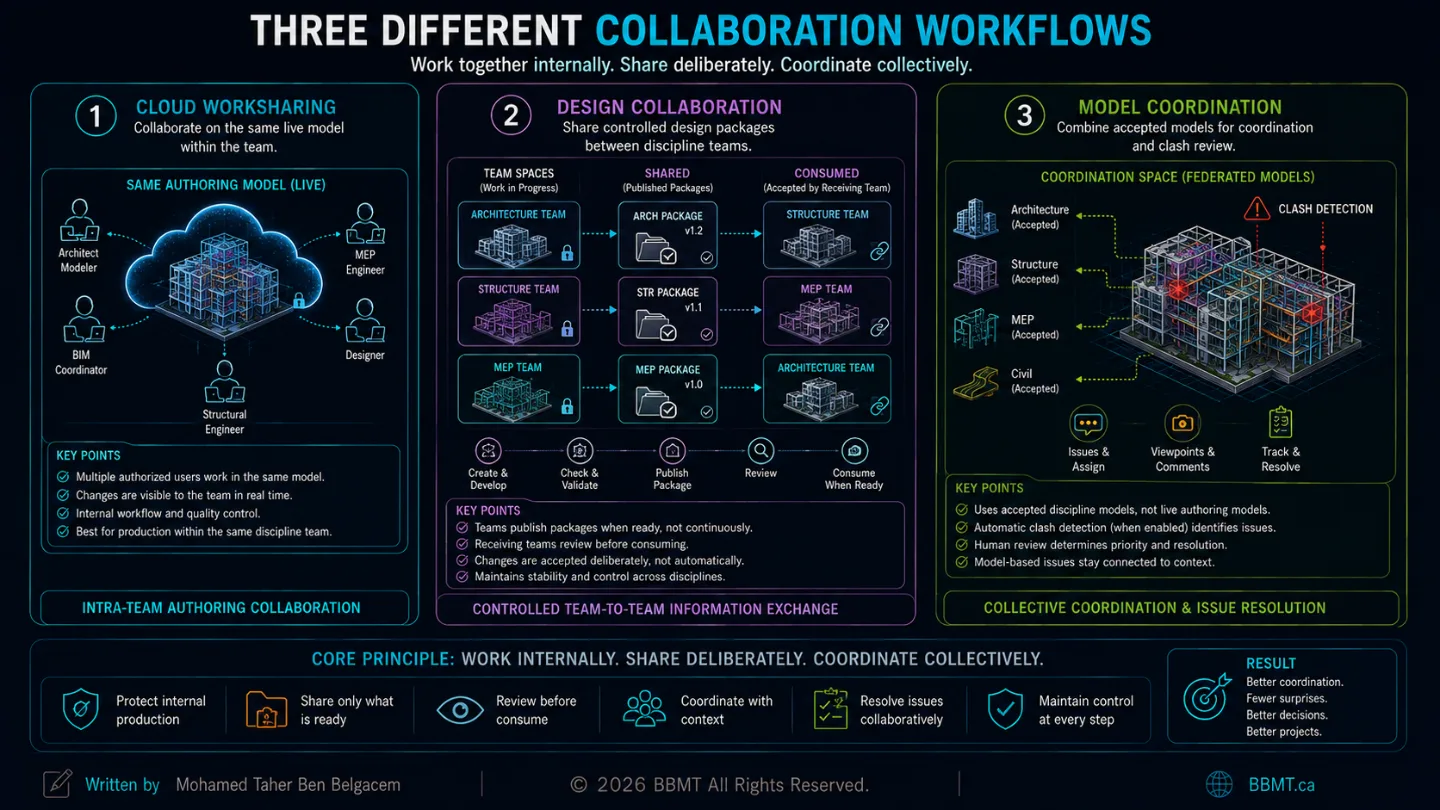
Cloud Worksharing
Cloud worksharing allows authorized members of the same design team to collaborate on an authoring model stored in the cloud.
For example, several Revit users may work on the same cloud-hosted model from different locations.
This is primarily an intra-team authoring workflow.
Design Collaboration
Design Collaboration manages controlled exchanges between teams.
Each discipline can work within its own team environment and decide when information is ready to be shared.
Autodesk’s current workflow creates team, Shared, and Consumed folder structures. These allow one team to publish a package and another team to review and consume it deliberately rather than automatically accepting every live change.
A typical process is:
The architecture team develops its work.
The team checks the model.
A design package is shared.
The structural team reviews the package.
The structural team consumes the package when ready.
Its references update in a controlled manner.
This creates an important separation between:
Live internal production
Information intentionally shared with others
Information accepted into another team’s workflow
Why Consumed Information Matters
Directly linking to another team’s constantly changing live model may create instability.
A change made at 4:00 p.m. could unexpectedly affect another team’s model at 4:05 p.m.
A controlled consume workflow allows the receiving team to:
Review the package
Understand what changed
Decide when to accept it
Coordinate its own production schedule
Preserve a record of the exchange
8. Model Coordination: Federation and Clash Review
Model Coordination provides an environment for uploading, combining, reviewing, and detecting clashes between supported three-dimensional project models.
Coordination Spaces
A coordination space is configured against selected folders in Forma Data Management.
The administrator defines:
Which folders are included
Which model formats are considered
Who may access the space
Whether automatic clash detection is enabled
Coordination spaces can be configured with clash detection turned on or off.
When turned on, the system automatically identifies intersections between objects in the included supported models. When turned off, teams may still aggregate models, perform constructability review, and create issues without generating clash data.
Automatic Does Not Mean Autonomous
Automatic clash detection does not determine:
Whether the clash is important
Which discipline is responsible
Whether an opening is already planned
Whether an overlap is intentional
Which system should move
Whether the issue affects construction
What priority it should receive
Human coordination remains necessary.
The platform detects geometric conditions.
The coordination team determines their meaning.
Model-Based Issues
A coordination issue should contain enough context for the responsible team to act.
Useful information includes:
Clear title
Description
Assigned team
Priority
Due date
Viewpoint
Snapshot
Model location
Referenced objects
Required action
Status
Comments
The issue should remain connected to the model and revision in which it was identified.
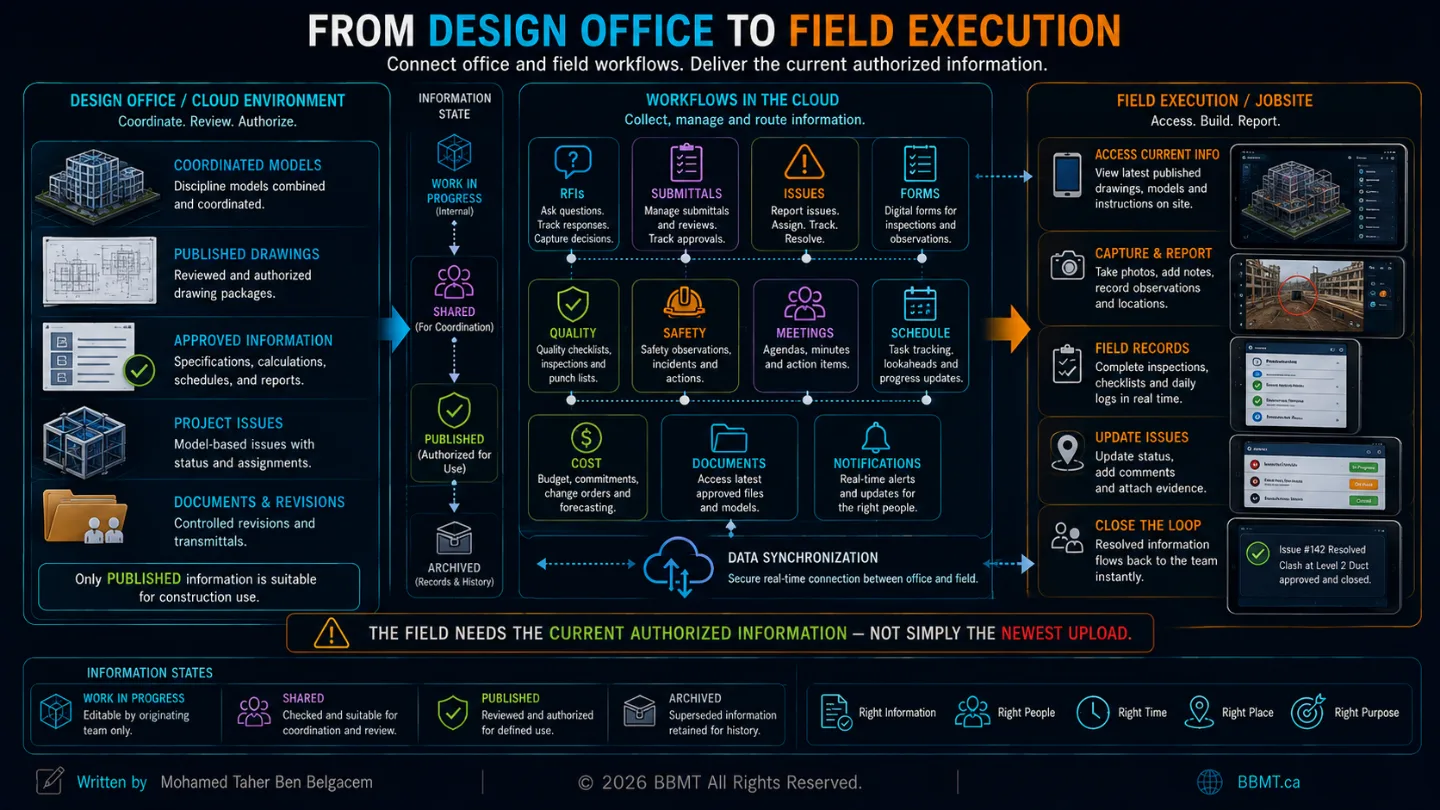
9. Forma Build: From the Office to the Jobsite
Forma Build extends the cloud environment into construction and field execution.
Autodesk describes it as a toolset connecting workflows between the office, site trailer, and jobsite.
It includes workflows for:
Issues
Forms
Quality
Safety
RFIs
Submittals
Meetings
Schedule tracking
Cost management
Project files and models
RFIs
A Request for Information should connect:
The question
The responsible party
Related drawings or models
Relevant locations
Due dates
Responses
Potential cost or schedule effects
Final resolution
A cloud RFI process preserves this history and makes the response visible to appropriate participants.
Submittals
Submittal workflows may manage:
Product data
Shop drawings
Samples
Technical sheets
Review responsibilities
Required dates
Approvals and revisions
The value comes from connecting each submittal to the project context rather than managing it through disconnected email chains.
Forms, Quality, and Safety
Digital forms can support:
Inspections
Safety observations
Quality checklists
Equipment checks
Commissioning
Daily records
Deficiency tracking
Field personnel can record information at the location where the work is occurring.
The Latest Information on Site
Field teams should be able to identify:
The current authorized drawing
The current model
Superseded revisions
Open issues
Current RFIs
Approved submittals
Required inspections
A cloud platform reduces the delay between office decisions and field access.
It does not eliminate the need to define which information is approved for construction.
10. Insight and Construction IQ: Analytics With Human Oversight
Large projects may generate thousands of:
Issues
RFIs
Forms
Reviews
Submittals
Model changes
Quality observations
Safety records
Project leaders cannot manually interpret every data point at the same time.
Insight
Insight provides dashboards and reporting based on information collected through connected project workflows.
Depending on access and available data, it can help teams examine:
Design issues
Quality
Safety
Project controls
Risk
Cross-project performance
Construction IQ
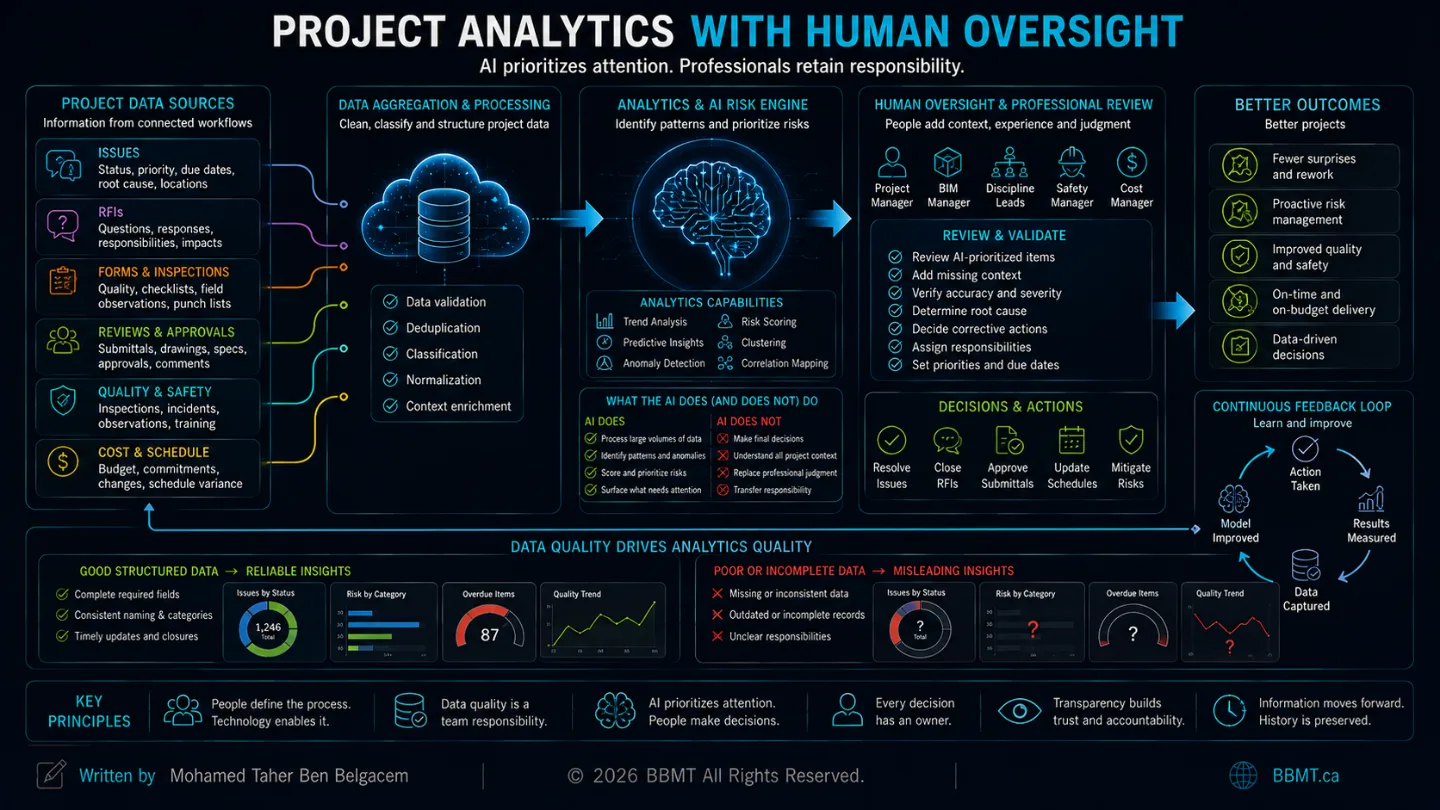
Construction IQ applies analytics and machine-learning techniques to project information to help identify and prioritize potentially higher-risk items.
Autodesk states that it may analyze hundreds or thousands of issues and prioritize projects, subcontractors, and items requiring attention.
However, Autodesk also warns that:
Not every item identified as high risk will necessarily be high risk.
The system may fail to identify some high-risk items.
The results should support—not replace—professional experience and existing safety or management processes.
This is an important principle for every AI-assisted project platform:
AI may prioritize attention. It does not transfer professional responsibility.
Data Quality Controls Analytics Quality
A dashboard cannot produce meaningful insight from inconsistent project data.
Analytics depend on teams consistently completing:
Status fields
Due dates
Assignments
Categories
Locations
Root causes
Issue closure
Cost and schedule impacts
Poorly maintained workflows produce misleading dashboards.
11. Connecting the DMS and BIM Environment
A mature organization may use both:
An enterprise DMS such as SharePoint
A BIM-aware CDE and collaboration platform such as Autodesk Forma
The challenge is to connect them without duplicating uncontrolled information.
Pattern 1: Controlled Publication
The project team develops and coordinates information in the BIM platform.
Approved contractual or permanent records are then published to the enterprise DMS.
Pattern 2: Linked Information
The authoritative information remains in one system.
The second system contains a controlled link rather than a duplicate file.
Pattern 3: Managed Copy
A copy is transferred for a defined purpose.
Its status, revision, transfer date, and relationship to the original are recorded.
Pattern 4: API Integration
An integration transfers metadata, files, issues, or status information automatically.
The integration should define:
Direction of transfer
Trigger
Frequency
Conflict handling
Error reporting
Ownership
Security
Auditability
Pattern 5: Formal Transmittal
Information moves between systems through a documented issue or transmittal process.
This is often appropriate for contractual or milestone exchanges.
Avoid Blind Bidirectional Synchronization
Uncontrolled two-way synchronization can cause:
Duplicate records
Circular updates
Overwritten revisions
Lost metadata
Conflicting permissions
Unclear ownership
Two apparent “current” versions
The goal is not to make every system contain everything.
The goal is to make every participant know where the authoritative information belongs.
12. Security, Access, and Information Sensitivity
Cloud collaboration increases accessibility.
It also increases the importance of security-minded information management.
ISO 19650-5 establishes principles for managing sensitive information and developing an appropriate security culture for organizations handling built-asset information.
A project should consider:
Role-based access
Least-privilege permissions
Multi-factor authentication
External-member controls
Download restrictions
Sensitive locations
Personal information
Security-related asset data
Export permissions
Audit monitoring
Member removal
Data-retention requirements
Not every participant requires access to every model, document, or property.
The purpose of a CDE is controlled availability—not unrestricted availability.
13. Common Cloud-Collaboration Failures
Failure 1: Treating the Platform as a Folder
The team uploads files but does not configure:
Roles
Reviews
Permissions
Metadata
Status
Publication
Archive procedures
Failure 2: Giving Everyone Full Access
Broad access may feel collaborative but increases the risk of deletion, unauthorized sharing, incorrect publication, and accidental modification.
Failure 3: Linking Directly to Uncontrolled Live Models
Receiving teams become exposed to unexpected changes without an intentional exchange or acceptance process.
Failure 4: Confusing Shared With Published
A model suitable for coordination may not yet be approved for procurement, fabrication, or construction.
Failure 5: Maintaining Duplicate Authoritative Files
The same document is treated as current in the DMS, CDE, email attachments, and local folders.
Failure 6: Allowing Issues to Lose Their Model Context
Screenshots and written descriptions replace connected viewpoints, object references, locations, and revision information.
Failure 7: Measuring Activity Instead of Quality
A dashboard reports high numbers of uploads, comments, and closed issues but does not verify whether the information is correct.
Failure 8: Purchasing Technology Before Designing the Process
The organization licenses a platform and expects its default setup to create collaboration automatically.
14. The Cloud Collaboration Implementation Checklist
Before launching a project environment, define the following.
Information Architecture
Systems included in the stack
Authoritative platform for each information type
Folder and container structure
Naming convention
Metadata requirements
Revision rules
Responsibilities
Project administrator
Information manager
BIM manager
Discipline leads
Reviewers
Approvers
Publishers
Archive owner
Permissions
Internal members
External members
View access
Download access
Upload access
Edit access
Administrative access
Sensitive-information restrictions
CDE States
Work in Progress
Shared
Published
Archived
Required status metadata
Transition criteria
Review and authorization responsibility
Design Collaboration
Team spaces
Sharing frequency
Package naming
Consume process
Linked-model strategy
Model-review responsibilities
Coordination
Coordination spaces
Included folders and formats
Clash configuration
Tolerance rules
Issue classifications
Assignment process
Validation and closure rules
Construction Workflows
RFIs
Submittals
Issues
Forms
Safety
Quality
Meetings
Schedule
Cost
Field-device access
Integration
DMS connection
API requirements
Transfer direction
Synchronization rules
Error handling
Audit trail
Archival process
Governance
Training
Support
Naming audits
Permission reviews
Workflow audits
Data-quality checks
Offboarding
Project closeout
Conclusion: Process Before Platform
A cloud platform does not create collaboration.
It enforces—or exposes—the collaboration process designed by the project team.
Forma Data Management can provide files, permissions, reviews, transmittals, and issues.
Forma Design Collaboration can control design packages and team exchanges.
Model Coordination can aggregate models and identify geometric clashes.
Forma Build can connect office and field workflows.
Insight and Construction IQ can organize project data and help prioritize attention.
SharePoint or another enterprise DMS can maintain corporate, contractual, and long-term records.
But none of these systems can independently decide:
Who owns the information
What must be delivered
When it is ready to be shared
Who is authorized to approve it
Which revision may be used
Where the permanent record belongs
Who remains responsible for a decision
Those rules must be defined by the project team.
The strongest cloud collaboration stack is not the stack with the greatest number of applications.
It is the one in which:
Every system has a clear role.
Every information type has an authoritative location.
Every participant understands the workflow.
Every revision is traceable.
Every approval is visible.
Every exchange has a defined purpose.
Every team can access the right information at the right time.
That is how cloud technology becomes more than storage.
It becomes controlled information flow.